Home › Products › Rapid Payoff Calculator
$29 one-time · No subscription · Private Windows app

Turn the payments you're already making into a clear plan for becoming debt-free

Enter your credit cards and other eligible debts with their balances, interest rates, and current payments. The Rapid Payoff Calculator organizes those payments into a structured payoff plan. As one balance reaches zero, its payment is redirected to the next debt instead of disappearing back into your monthly spending.

Purchase coming soon — $29 Try the free online version first

No bank connection · No web login · No subscription · 30-day money-back guarantee

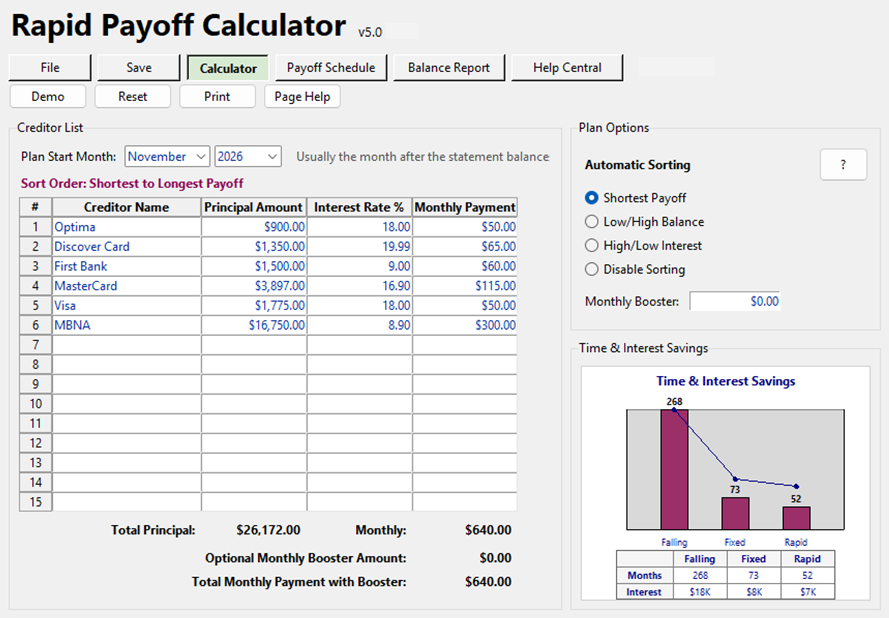
Rapid Payoff Calculator main screen showing creditors, sorting options, and the savings chart

More than a free online calculator

"Okay… now what do I actually do each month?"

Free calculators give one answer

Helpful for a quick estimate, then they disappear. You're left re-entering everything the next time you want an update.

This gives you a system

A saved plan you can reopen, a printable month-by-month Payoff Schedule, and a Balance Report you can follow as your debts go down.

And it shows you why it works

Compare letting payments fall, keeping payments fixed, and the Rapid Payoff Plan's snowball engine side by side, in time and interest saved.

See how it works

From a list of debts to a plan you can print

Real screens and printed reports from the app, shown with demo data: six debts, $26,172 total, and the same $640 a month the example household was already paying. Click any image to see it full size.

Rapid Payoff Calculator main screen with six creditors entered, automatic sorting options, and a Time and Interest Savings chart

1. Enter your debts

Creditor, balance, rate, and the payment you already make. Choose your payoff order.

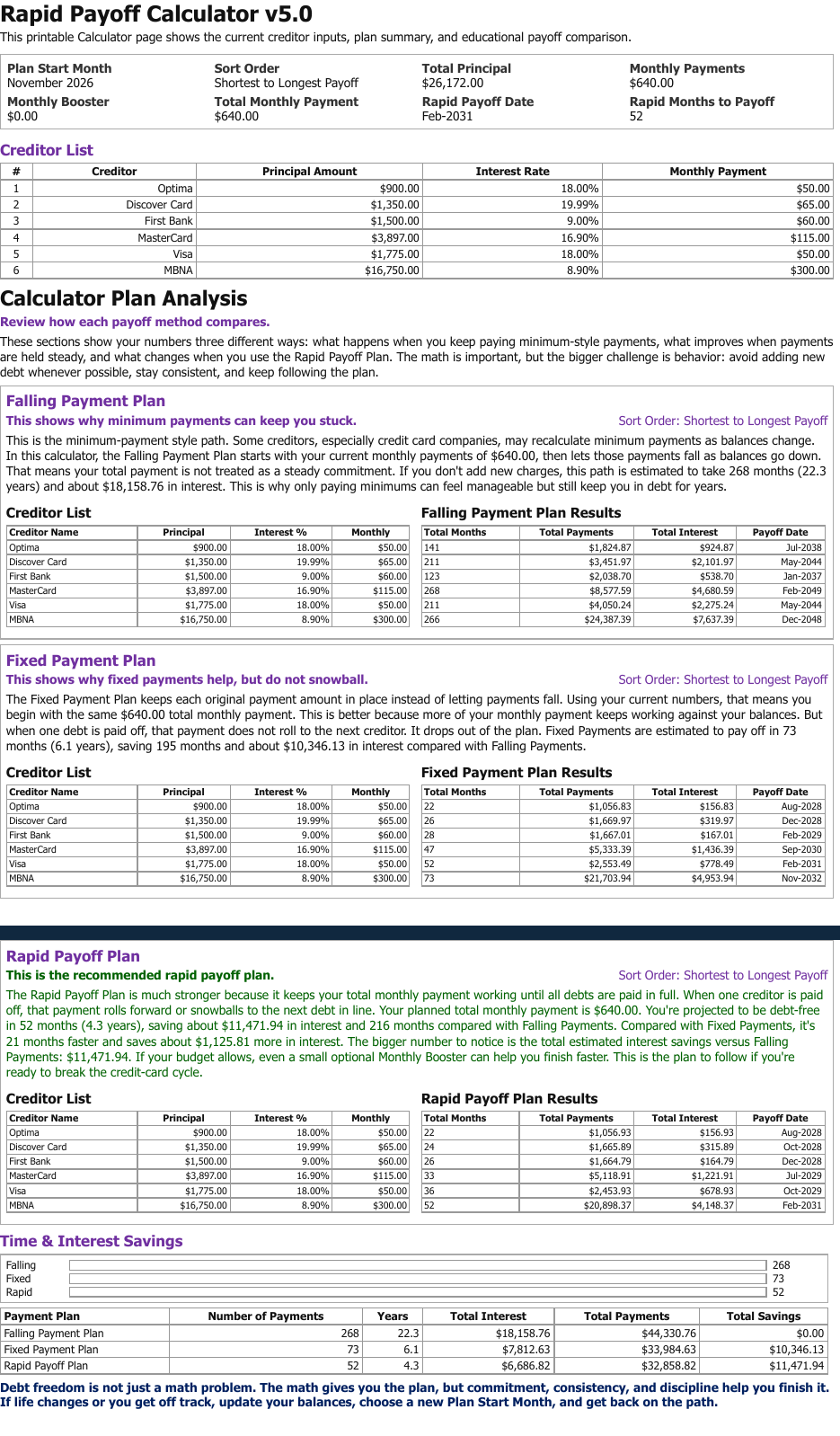
Rapid Payoff Calculator printed plan analysis comparing falling, fixed, and Rapid Payoff methods

2. Rapid Payoff Plan

A plain-English comparison of all three approaches, then the recommended plan: the same $640 a month, debt-free in 52 months. Sample PDF →

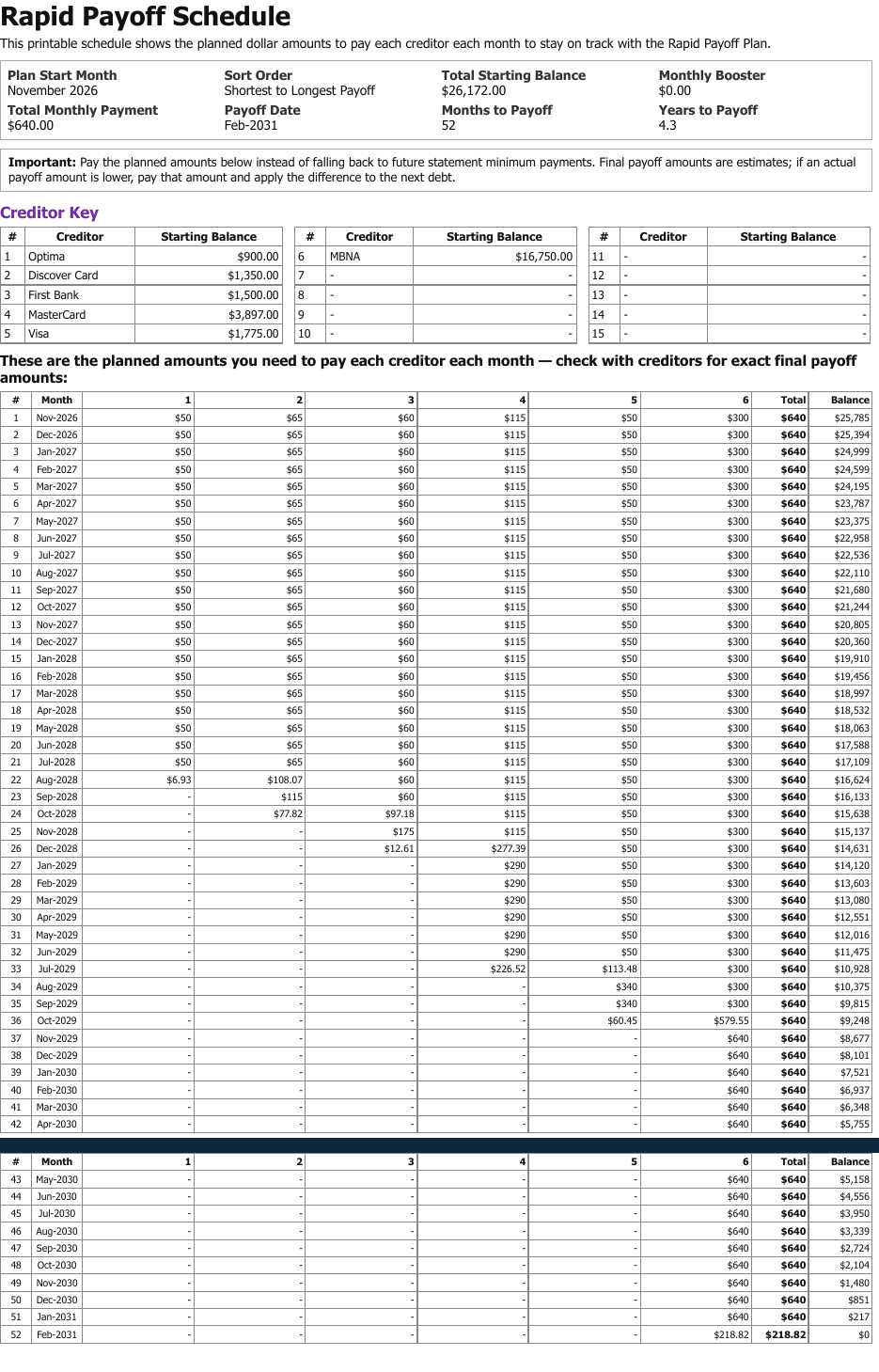
Printed Rapid Payoff Schedule showing the planned amount to pay each creditor every month until all debts are paid

3. Monthly Payoff Schedule

Exactly what to pay each creditor each month, all the way to the final payment and a $0 balance. Sample PDF →

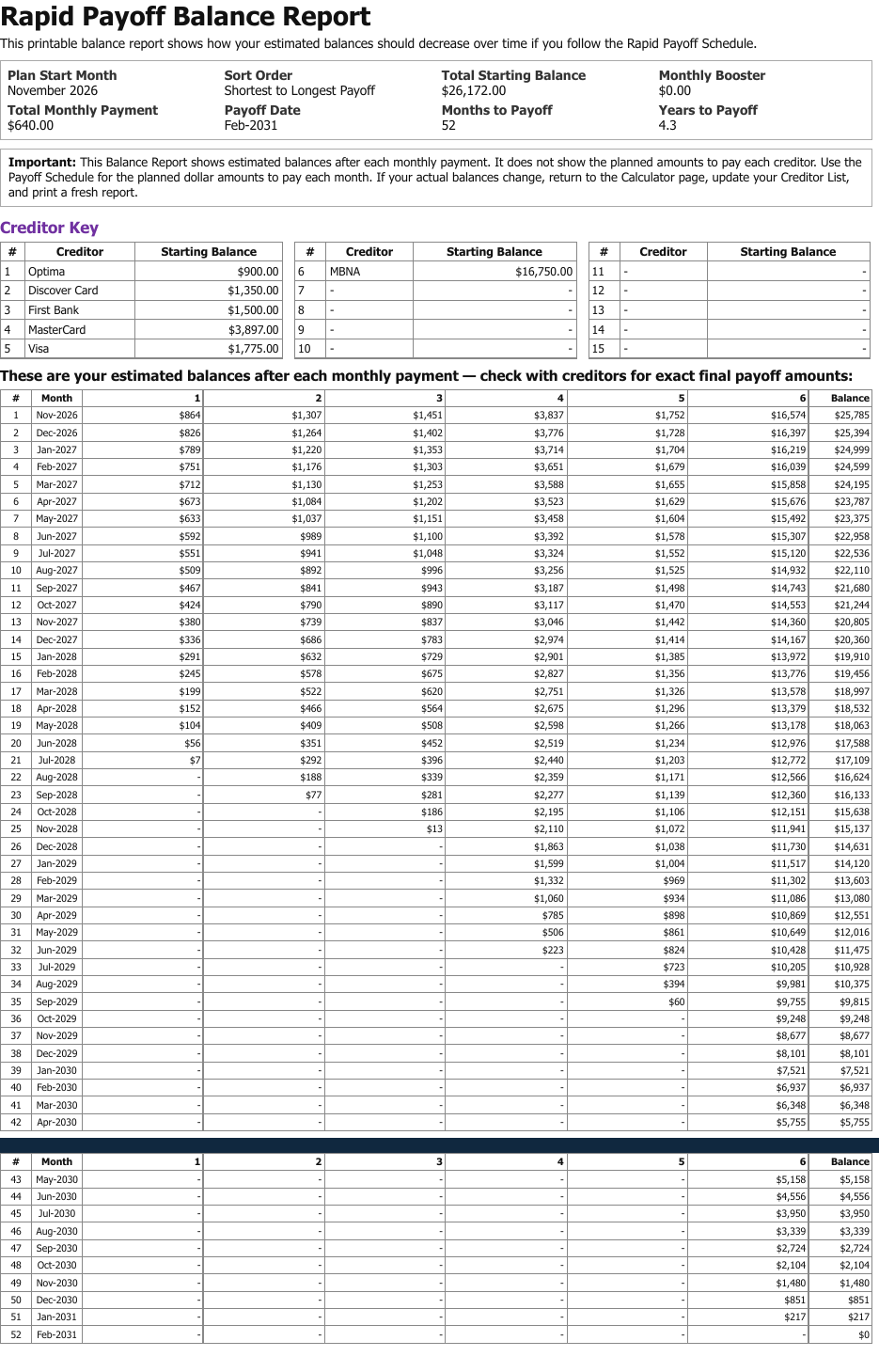
Printed Balance Report showing each creditor's estimated balance after every monthly payment

4. Balance Report

Each balance after every payment, from $26,172 down to $0. Sample PDF →

More of the app

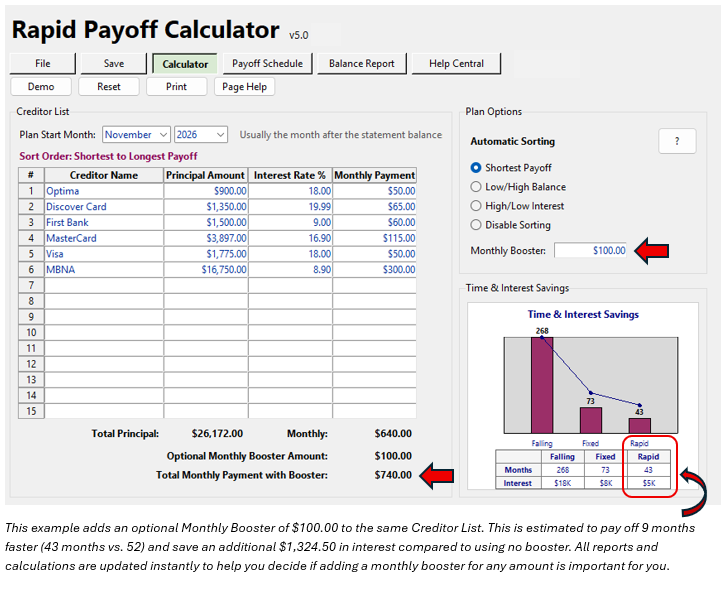
Calculator screen with an optional $100 Monthly Booster added to the same creditor list, with an explanation of the 9-month and $1,324.50 savings

Optional Monthly Booster

The plan works on what you already pay. Add any extra you can reasonably commit (here, $100 on the same creditor list) and see the result instantly: 9 months faster and about $1,324 less interest.

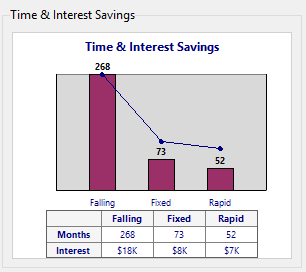
Time and Interest Savings chart comparing Falling, Fixed, and Rapid methods: 268, 73, and 52 months

Time & Interest Savings

268 months vs. 73 vs. 52. The same debts, three ways of paying them.

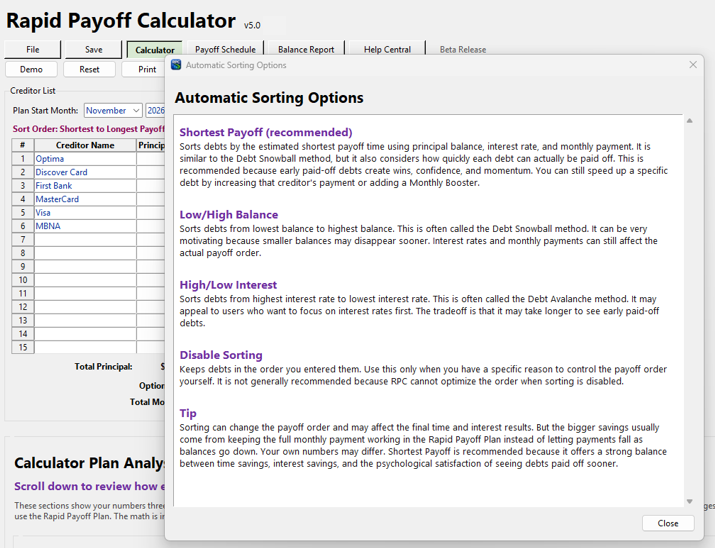
Automatic Sorting Options dialog explaining Shortest Payoff, Low/High Balance, High/Low Interest, and Disable Sorting

Choose your payoff order

Shortest payoff, lowest balance first, highest interest first, or your own order, each explained in plain English.

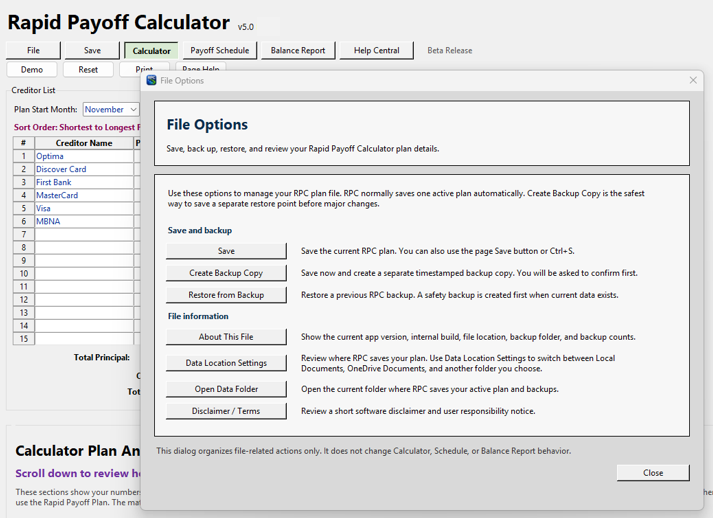
File Options dialog with Save, Create Backup Copy, Restore from Backup, and Data Location Settings

Save, back up, restore

Your plan is saved automatically; timestamped backups and data-location choice are built in.

Read the guides before you buy. These are the same guides built into the app.

Start with the payments you're already making

The same money keeps working until the debt is gone

You don't have to overhaul your budget to get started. The Rapid Payoff Calculator begins with the monthly payments you already make, then shows how those same payments work harder when they're organized into a deliberate order. It supports building block 6 of the PlanAhead Money framework: Create a Rapid Debt Payoff Plan.

As each debt is paid off, its payment rolls into the next one. Then the next. Then the next. Completed payments keep working instead of quietly disappearing back into everyday spending — that's why your payoff momentum builds rather than shrinks as debts disappear.

  • Choose the payoff order that works for you: sort by balance, interest rate, estimated payoff time, or your own preferred order
  • Completed payments roll forward into the remaining debts automatically
  • Estimated payoff date, months to payoff, total interest, and total payments at a glance
  • Optional Monthly Booster: add any extra amount you can reasonably commit and see how it changes the estimated payoff date and interest cost

What's included

  • Rapid Payoff Calculator for Windows
  • Printable month-by-month Payoff Schedule (see a sample)
  • Printable Balance Report showing projected balances after each payment
  • Strategy comparison: letting payments fall vs. keeping them fixed vs. the Rapid Payoff Plan
  • Updates normally included for your current version
  • 30-day money-back guarantee

$29 one-time

Purchase coming soon

Install it and continue using the version you purchased with no recurring fee.

Want Freedom Account too? Get both in the PlanAhead Money Bundle for $49 →

Why customers choose it

Simple, private, and practical

Simple debt entry

Enter creditor name, balance, interest rate, and monthly payment in a familiar spreadsheet-style layout. No complicated setup, no account syncing, no financial jargon.

Instant Rapid Payoff Plan

As soon as your debts are in, the plan calculates. Your debt payoff goal becomes something specific, measurable, and easier to follow.

Printable schedule and report

A plan is easier to follow when you can see it. Print the month-by-month schedule so you know what to pay, and the Balance Report so you can watch the balances fall.

Monthly Booster

Want to go faster? Add any extra amount you can reasonably commit each month and immediately see how it may change your estimated payoff date and interest cost. Test realistic "what if" scenarios before you commit.

Private desktop app

Your debt information is personal. The calculator runs on your Windows computer with no web account, bank connection, or cloud dashboard. You control your data.

Save, reopen, update, print

Life happens. When balances change, reopen your saved plan, update the numbers, recalculate, and print a fresh schedule. No starting over from scratch.

Life happens

Your plan can adjust

An unexpected car repair, medical bill, family expense, or temporary income change can affect your balances or how much extra you can pay. That does not mean your plan is ruined.

Reopen your saved plan, update the balances or payments, recalculate, and print a fresh Payoff Schedule and Balance Report. You don't have to be perfect. You just need a plan you can update and keep using.

The Rapid Payoff Calculator began about twenty years ago as an Excel tool built in response to repeated customer requests for a clear way to organize debt and see how a payoff plan could work. Today's version is a private Windows app built on that same idea.

Common questions

What kinds of debt does it handle?

Credit cards and most other non-mortgage debts where you can enter a current balance, interest rate, and monthly payment: store cards, personal loans, medical bills, and similar. It is not intended for mortgages, balloon notes, or complex loan amortization. For those, rely on your lender's official payoff or amortization information.

Which order should I pay debts in?

That's your call, and the calculator supports whichever approach fits you. Sort by balance, interest rate, estimated payoff time, or set your own order. Whatever you choose, the Rapid Payoff process keeps completed payments working by rolling them into the remaining debts.

What do I need to run it?

A Windows PC. The calculator is a desktop application; no browser, no login. Tested on Windows 11; compatibility with Windows 10 and earlier versions has not been confirmed.

Is this a subscription?

No. Buy it once, install it, and continue using the version you purchased with no recurring fee.

Will an update preserve my saved plans?

Updates to your current version are designed to preserve your existing saved plans and are normally provided at no additional charge when available. Major future versions or substantial new capabilities may be offered separately. Follow the backup and installation instructions provided with each update.

What if it's not for me?

We plan to offer a 30-day money-back guarantee. Full terms and the refund process will be published before purchasing opens.
A simple plan can change everything

Enter your debts. Choose your payoff order. Print your schedule. Add a Monthly Booster when you're ready to go faster. Update the plan when life changes. Progress is better than perfection.

Rapid Payoff Calculator — $29 · Purchase coming soon

Not sure yet? Run your numbers in the free online calculator first.