Home › Products › Freedom Account
$29 one-time · No subscription · Private Windows app

Prepare for life's irregular expenses — and the unexpected costs you know will eventually happen

Some expenses are predictable: insurance renewals, holidays, annual bills, and vacations. Others arrive without a useful warning: a car repair, an appliance that quits, an unexpected medical expense, or something around the house that suddenly needs attention. Freedom Account helps you gradually set money aside for both, organize those savings into meaningful categories, and see what your money is prepared to handle.

Purchase coming soon — $29 See how it works

No bank connection · No web login · No subscription · 30-day money-back guarantee

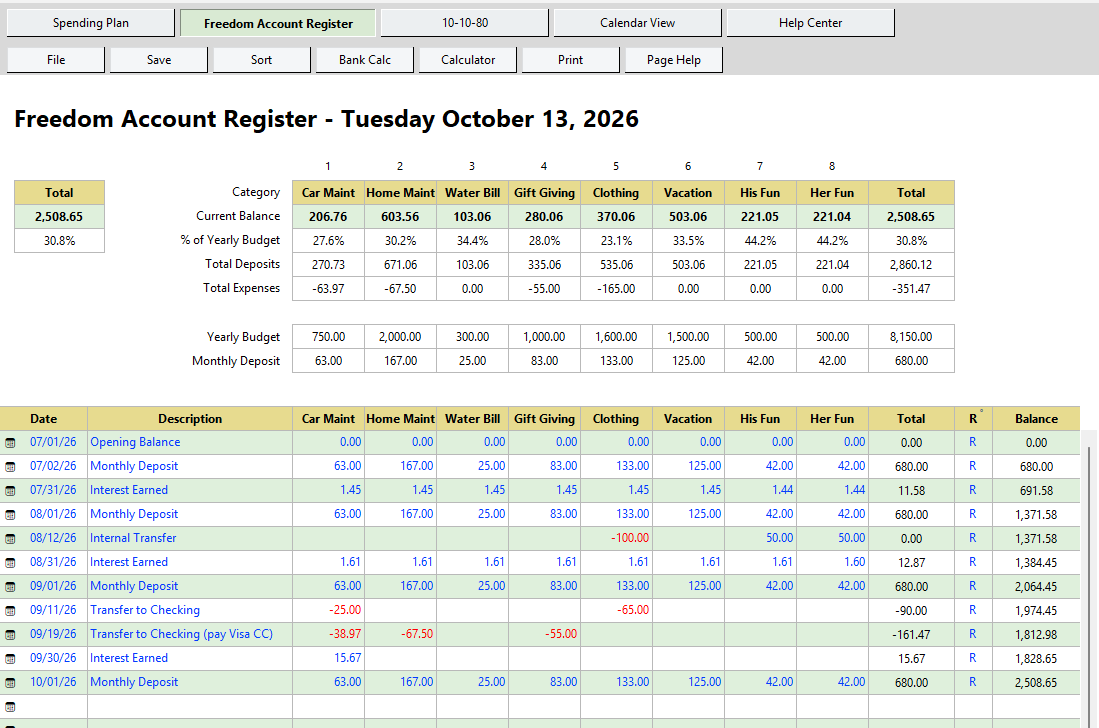
Freedom Account Register showing category balances and transactions

How it works

Start with a few categories. Build from there.

1. Create your categories

Insurance, car repairs, home maintenance, medical costs, holidays, travel, pet care, appliance replacement, and Fun Money. Some have a date you can plan for; others you simply know will eventually happen. Start with two to four and grow from there.

2. Get your deposit amount

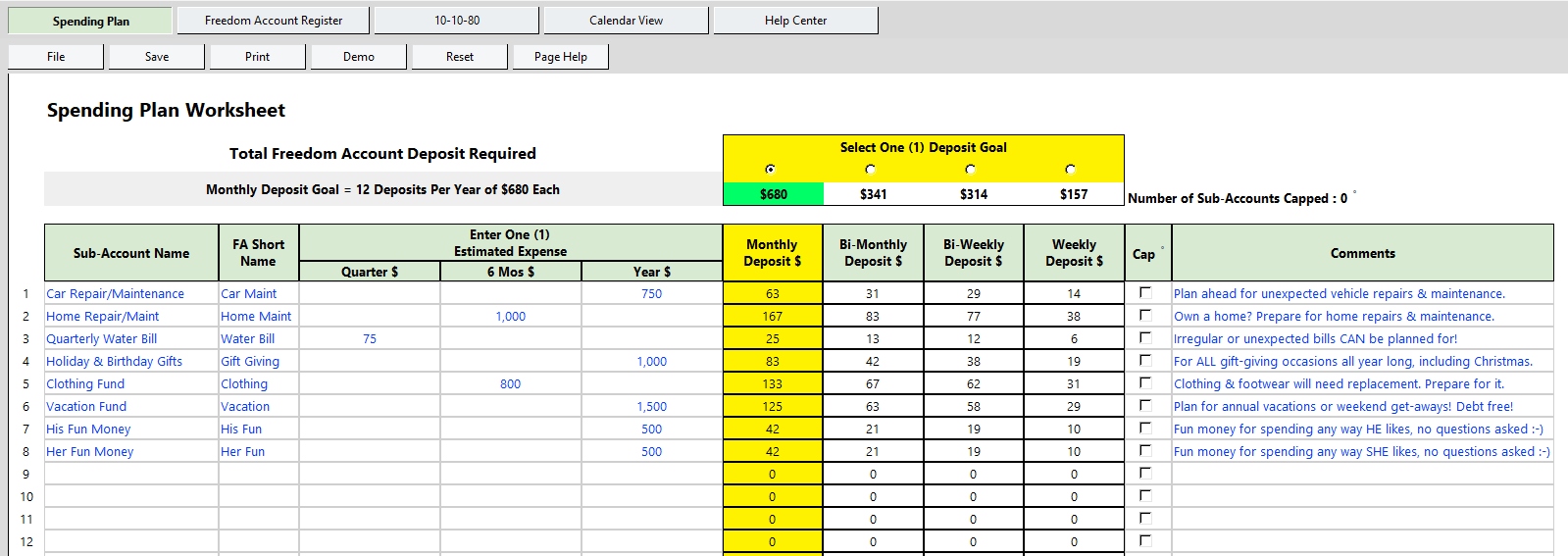
The Spending Plan turns those future expenses into one practical deposit amount. Spread irregular expenses across the year so they never become emergencies later.

3. Track it in the Register

Record deposits, expenses, transfers, and interest in a purpose-built register. Every category shows its real balance, so you can see whether you're ready when the bill arrives.

See how it works

A familiar layout. A clearer picture of your money.

Real screens from the app, shown with demo data. Click any image to see it full size.

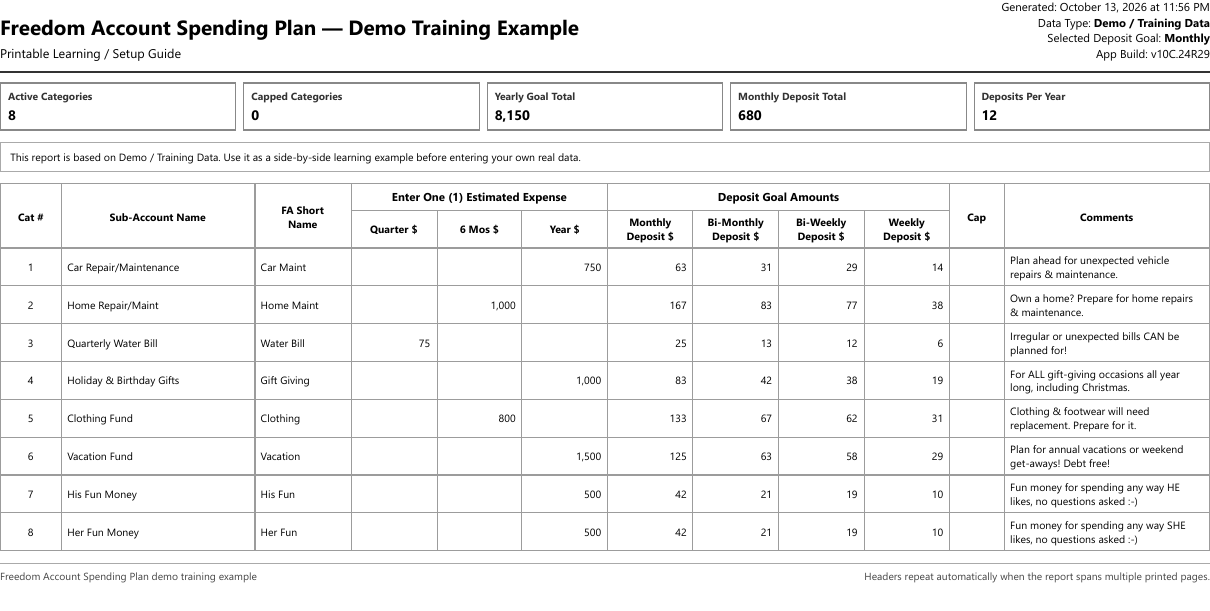
Freedom Account Spending Plan worksheet showing eight categories with yearly estimates and monthly, bi-monthly, bi-weekly, and weekly deposit amounts

Spending Plan

Create categories, enter a yearly or quarterly estimate, and see the deposit needed to fund each goal.

Freedom Account Register showing category columns, current balances, percent of yearly goal, and a list of deposits, interest, transfers, and expenses

Register

Record deposits, expenses, transfers, and interest while every category balance stays current.

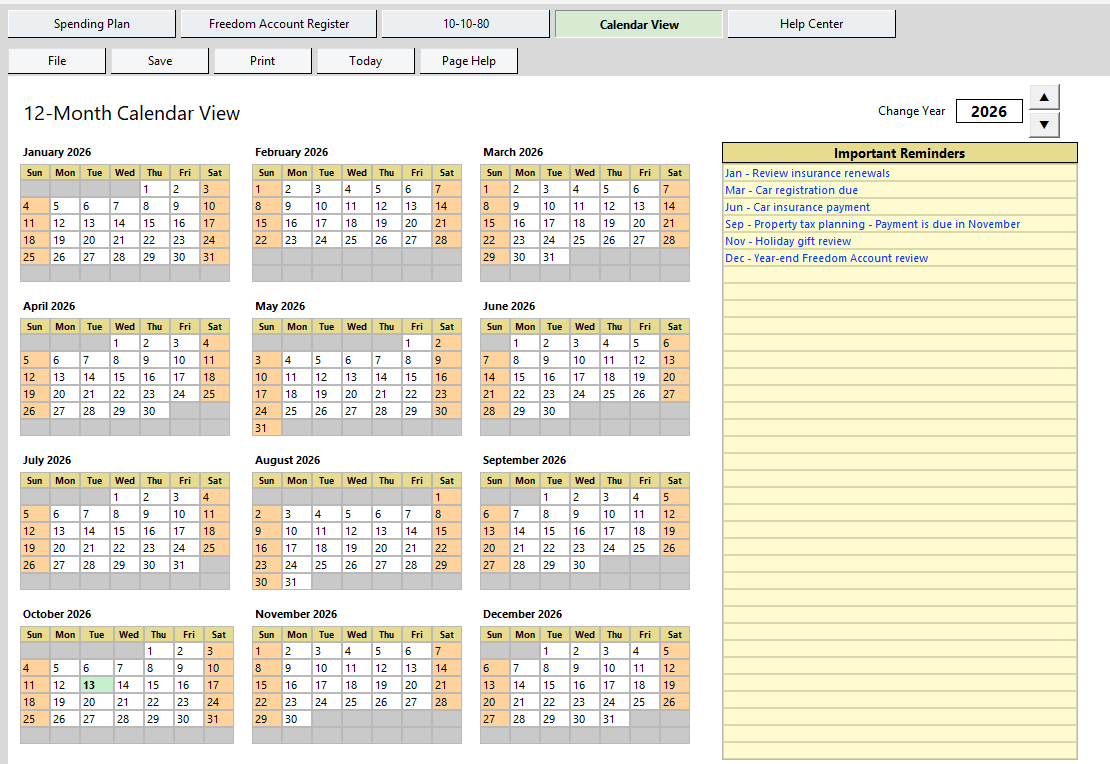
Freedom Account 12-month Calendar View with a list of important reminders such as insurance renewals and property tax planning

Calendar View

A year-at-a-glance page for the reminders that connect to future expenses.

More of the app

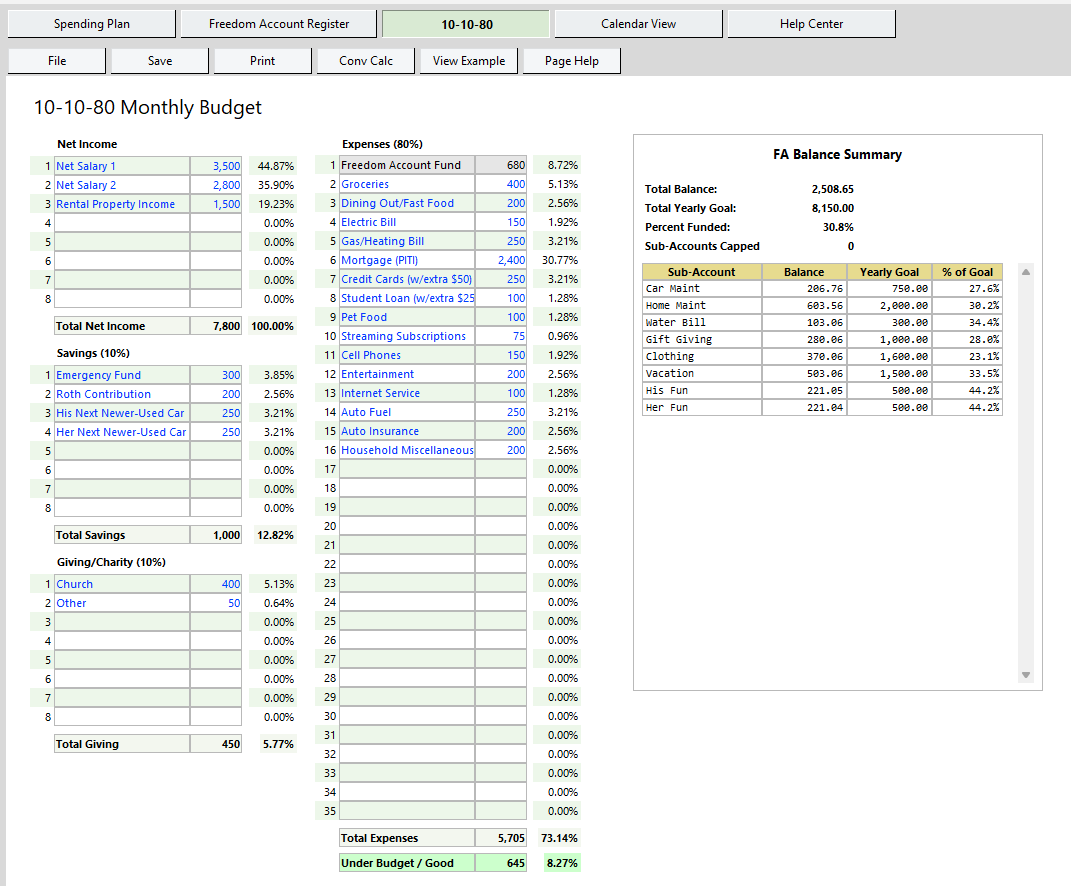
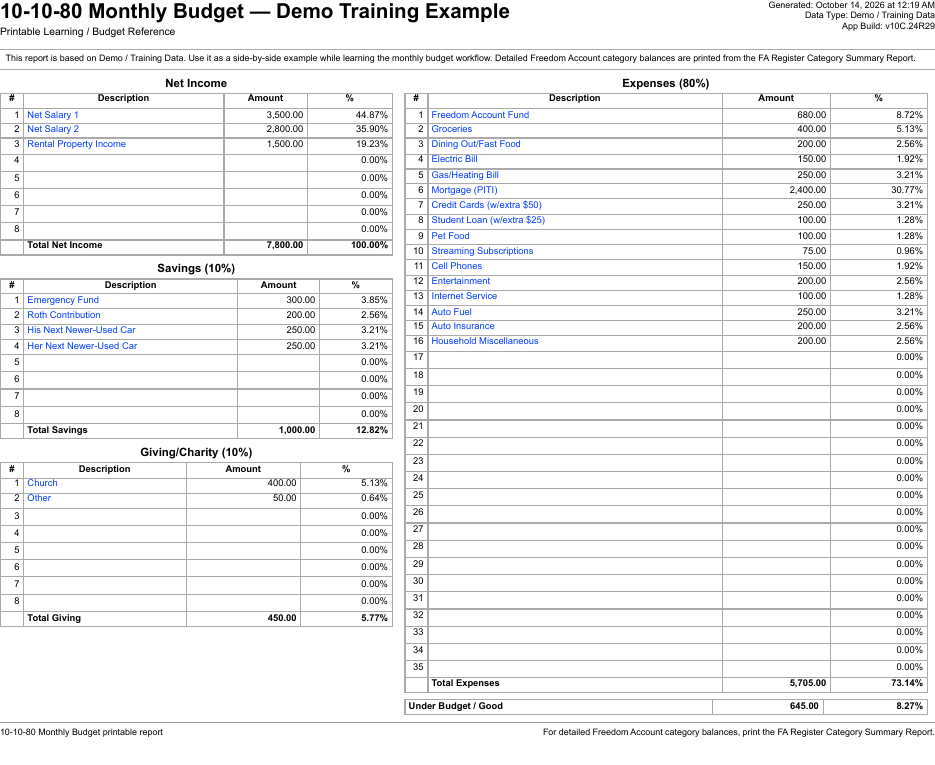
10-10-80 Monthly Budget page showing net income, savings, giving, expenses, and a Freedom Account balance summary

10-10-80 Monthly Budget

An optional monthly structure with your Freedom Account deposit built in.

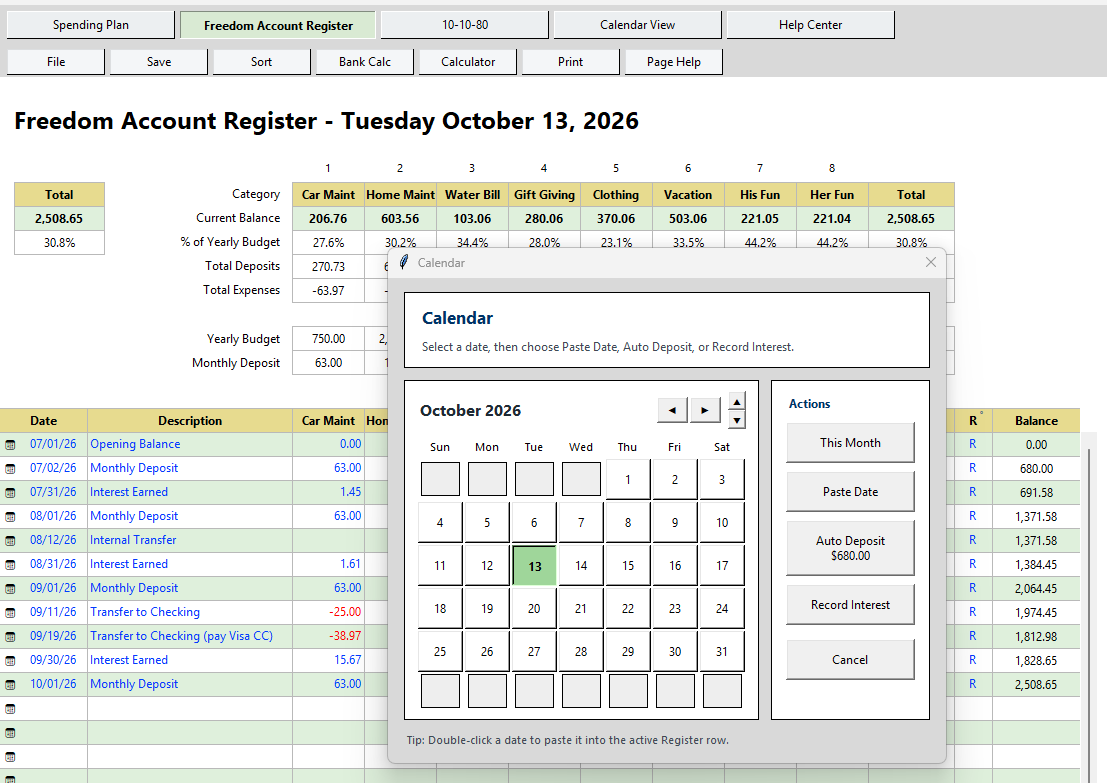
Register calendar popup with Paste Date, Auto Deposit, and Record Interest actions

Auto Deposit

Pick a date and allocate your recorded deposit across categories in one step.

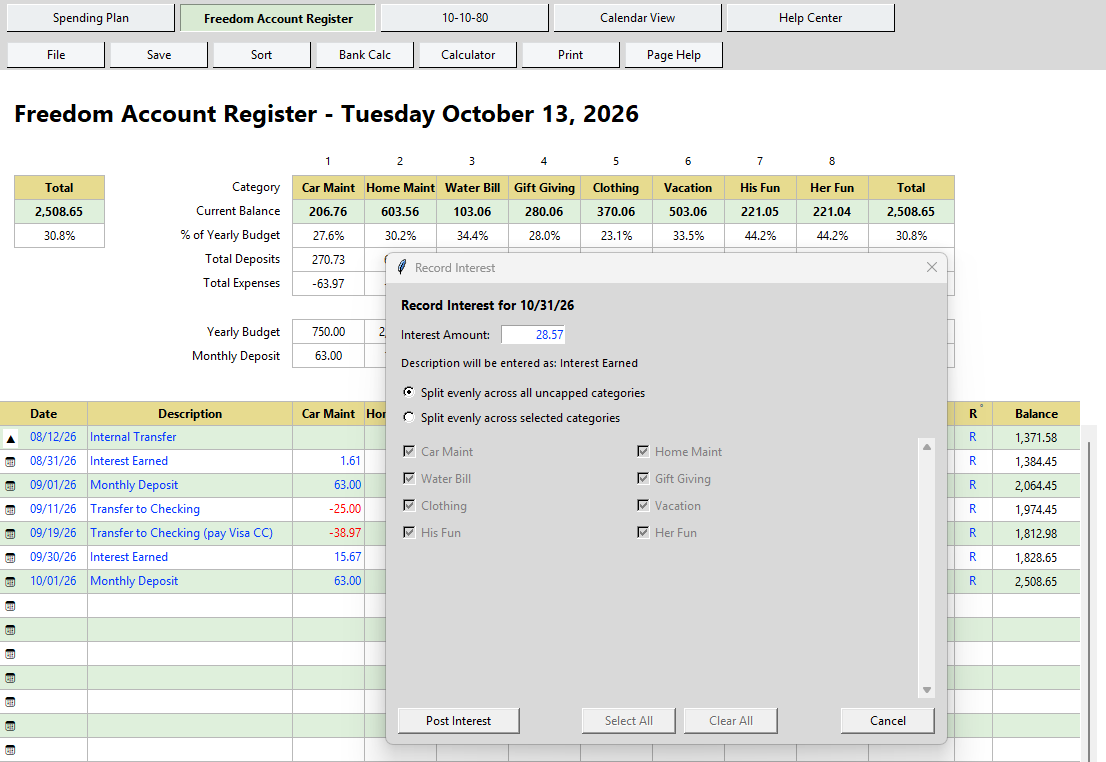
Record Interest dialog splitting earned interest evenly across categories

Record Interest

Allocate savings interest across all or selected categories.

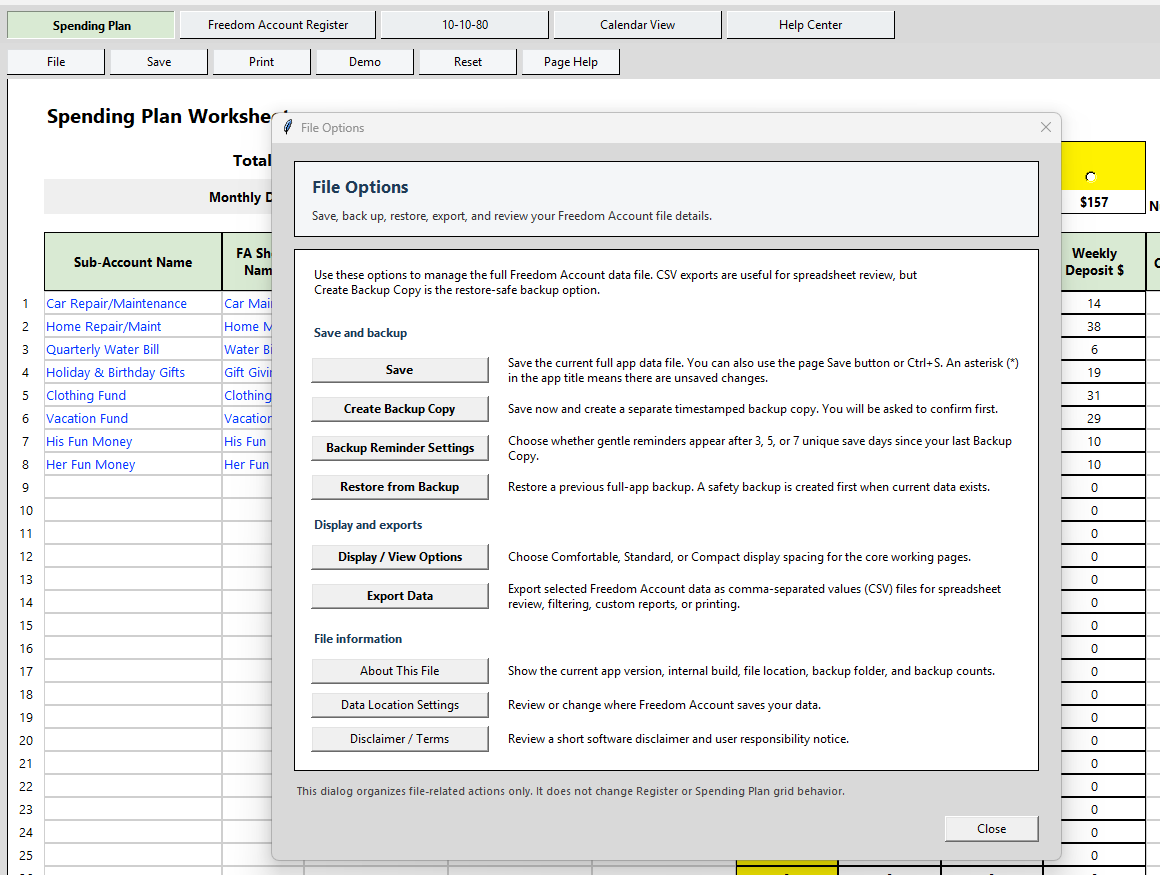
File Options dialog with Save, Create Backup Copy, Restore from Backup, Export Data, and Data Location Settings

Backups & data location

Save, back up, restore, export to CSV, and choose where your data file lives.

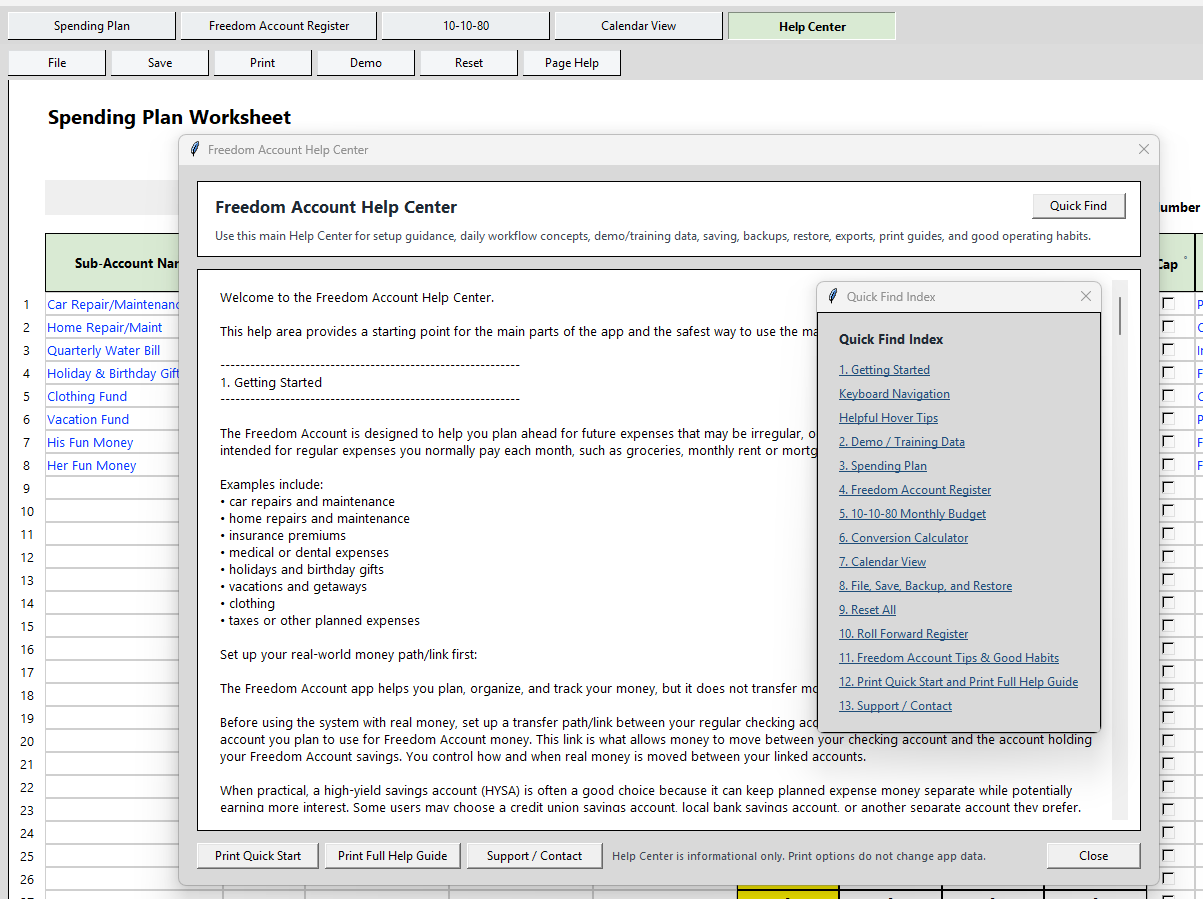
Freedom Account Help Center with a Quick Find index of thirteen help topics

Built-in Help Center

Page help, a Quick Find index, demo data, and printable guides.

Printable reports (from the Print button in the app)

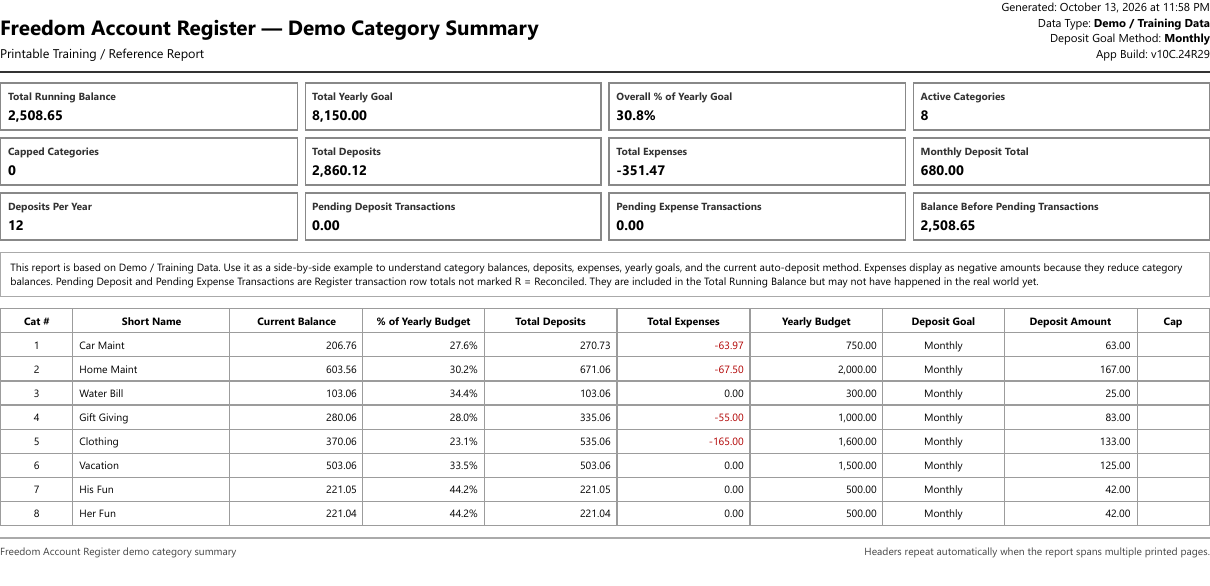
Freedom Account Register Category Summary report with totals and a table of every category's balance, deposits, expenses, yearly budget, and deposit amount

Register Category Summary

Every category's balance, goal, deposits, and expenses on one page, without printing a wide grid. Sample PDF →

Freedom Account Spending Plan Summary report listing categories with estimated expenses and deposit amounts

Spending Plan Summary

Your categories, estimates, and deposit schedule, ready to keep with your paperwork. Sample PDF →

Freedom Account 10-10-80 Monthly Budget report showing income, savings, giving, and expenses

10-10-80 Monthly Budget

The optional monthly budget page as a printed report. Sample PDF →

Read the guides before you buy. These are the same guides built into the app.

A more positive way to think about a sinking fund

Your savings aren't sinking. They're building breathing room.

A sinking fund is simply money saved gradually for a future expense rather than paying the entire cost when it arrives. We prefer the name Freedom Account because the goal is to build financial breathing room.

Some categories fund a known bill with a known date. Others prepare for expenses you cannot predict precisely but reasonably expect over time, such as car repairs, home maintenance, medical costs, and pet care.

A Freedom Account does not replace your Emergency Fund. Ideally, it helps protect it. Emergency savings provide a cushion for major emergencies and income interruption. Freedom Account categories prepare for irregular expenses and unexpected normal-life costs, so you're less likely to raid emergency savings or add new credit card debt.

  • Familiar spreadsheet-style layout: rows, columns, running totals, color-coded amounts
  • Up to 50 flexible categories for the expenses and goals that matter to you
  • Optional funding limits show when a category has reached its planned amount
  • Internal transfers between categories without changing your total
  • Record savings interest and allocate it among one or more active categories

What's included

  • Freedom Account for Windows
  • Spending Plan, Register, Calendar View, and 10-10-80 Monthly Budget view
  • Demo data, Quick Start, Help Center, and printable Help Guide (preview the Quick Start PDF)
  • Updates normally included for your current version
  • 30-day money-back guarantee

$29 one-time

Purchase coming soon

Install it and continue using the version you purchased with no recurring fee.

Want the Rapid Payoff Calculator too? Get both in the PlanAhead Money Bundle for $49 →

Where does each dollar belong?

Freedom Account or Emergency Fund?

Freedom AccountEmergency Fund
Insurance renewalsJob loss
Car repairs & tiresExtended income interruption
Home maintenance & repairsMajor uninsured crisis
Medical & dental out-of-pocket costsSerious financial emergency
Holidays & gifts
Travel & vacations
Appliance replacement
Other irregular or unexpected normal-life costs

The goal isn't to predict everything. It's to prepare for enough of life's normal financial bumps that true emergencies can remain emergencies.

Where does the actual money go?

Your bank holds the dollars. Freedom Account remembers their jobs.

The Freedom Account app does not hold or move your money. It tracks the purpose of money you keep at the bank or credit union you choose. There is no bank linking, syncing, or need to provide bank login credentials.

A separate High-Yield Savings Account (HYSA) can work well for this money. Compare interest, access, fees, and account requirements to find an account that suits you. Linking that savings account to your checking account through your bank can make deposits and withdrawals convenient. That bank connection is separate from the Freedom Account app.

The app acts as your category ledger. It shows how much of your total savings balance belongs to Car Repairs, Insurance, Medical, Home Maintenance, Vacation, Fun Money, or the other categories you create.

Start simply

Start with two to four categories for the expenses that most often disrupt your budget. Add more as the routine becomes useful. The app supports up to 50 flexible categories, but you do not need to use them all.

Make room for enjoying life

Your Freedom Account can also fund the good things. Create categories for His Fun Money, Her Fun Money, golf, hobbies, outings with friends, weekend getaways, concerts, or vacation extras. A personal Fun Money category can be spent however you choose, because you intentionally set the money aside for that purpose.

Why customers choose it

More than envelopes, notes, or mental math

Auto Deposit

When you record a deposit, Auto Deposit can divide the recorded amount among selected categories according to your Spending Plan. Adjust the plan later and future entries follow it, while past Register transactions stay unchanged. Auto Deposit allocates entries inside the app; it does not move money at your bank.

Register Calculator

A vacation might be hotel, rental car, tickets, and dining on one credit card statement. Total the related charges and enter one clean Vacation amount in the Register.

Printable Summary Report

Review active categories, balances, yearly goals, deposits, expenses, pending totals, and which categories have reached their planned funding limit, all on one printable page.

Calendar View

A simple year-at-a-glance page for reminders: insurance renewals, annual bills, birthdays, seasonal spending. Seeing the year visually makes future expenses easier to anticipate.

10-10-80 Monthly Budget

For anyone who also wants a simple monthly structure, this view connects income, saving, giving, expenses, and Freedom Account funding in one practical page.

You choose where your data lives

Save your data file to Local Documents, OneDrive Documents, or any folder you pick. Built-in backup, restore, and CSV export keep your file safe and portable.

Life happens

Your Freedom Account can adjust

Even with a good plan, real life changes. A car repair happens sooner than expected. A vacation costs more than planned. Insurance goes up. That does not mean the plan failed — it means the plan is doing its job.

Freedom Account makes it easy to update categories, adjust savings goals, record what actually happened, move money between categories, and keep going. You don't have to be perfect. You just need a simple system you can update as life changes.

A Freedom Account is not about restriction. It's about preparation. When future expenses are organized and funded ahead of time, fewer financial decisions have to be made under pressure. That's the freedom behind the name.

Common questions

How is this different from an Emergency Fund?

Your Freedom Account sits between everyday checking and your Emergency Fund. It covers irregular expenses and the unexpected-but-normal costs of life — repairs, replacements, medical bills, holidays. Your Emergency Fund stays reserved for genuine emergencies like job loss or extended income interruption. Keeping the two separate protects both.

Does it connect to my bank?

No, and that's on purpose. Freedom Account is an independent tracking tool. You never enter bank login details, authorize account syncing, or depend on a web dashboard. Your bank holds the dollars; the app remembers their jobs.

What do I need to run it?

A Windows PC. Freedom Account is a desktop application, so there's no web login and nothing runs in a browser. Tested on Windows 11; compatibility with Windows 10 and earlier versions has not been confirmed.

Is my data private?

Your data file lives on your own computer (or in a folder you choose, such as OneDrive Documents). Nothing is uploaded to us. There are no advertisements and no account to create.

Is this a subscription?

No. Buy it once, install it, and continue using the version you purchased with no recurring fee.

Will I have to start over when the app is updated?

Normally, no. Updates to your current version are designed to preserve your saved data so you do not have to re-enter it. Updates to your current version will normally be provided at no additional charge when available. Major future versions, substantial new capabilities, or changes required by evolving technology may be offered separately. Follow the backup and installation instructions provided with each update; update availability and any charges will be explained when an update is offered.

What if it's not for me?

We plan to offer a 30-day money-back guarantee. Full terms and the refund process will be published before purchasing opens.
Create your personal Freedom Account system today

Create categories. Set yearly goals. Record deposits and expenses. Print helpful summaries. Update the plan when life changes. Progress is better than perfection.

Freedom Account — $29 · Purchase coming soon

New to the idea? Read: What is a freedom account?